


We were able to get 70 Mb/s up in the middle of a field with no connections other than just Starlink and some very small cellular coverage. We turned it around very quickly, and there were no delays. We had it all up before they woke up.
Senior engineer
On-set DIT and digital services company
Challenges:
⭕️ Uploading hundreds of GBs of editorial transcodes per day from remote locations.
⭕️ Reliable international file transfers without shipping hard drives.
⭕️ Productivity issues from overwhelmed networks due to UDP-based file transfer platforms.
⭕️ Wasting time guiding collaborators through complex user interfaces and hours of software setup.
MASV Solutions:
✅ MASV Multiconnect channel bonding for accelerated and reliable remote transfers.
✅ Flexible MASV Portals for easy, fast, storage integrated file uploads from anywhere.
✅ Web-based file transfer that moves files quickly and reliably without being a network bully.
✅ A user-friendly system anyone can use without software installations or detailed instructions.
Company Overview
The client is a major DIT and digital dailies company that provides mobile dailies labs, on-set video playback, archiving, color services including live grading, and automated VFX pulls. It performs on-set DIT work for large productions in remote locations across the world.

The Challenge: Moving Heavy Files From Remote Locations
The client collaborates with stakeholders across the world in various remote locations, often working with 6K and 8K footage totalling around 4TB per day.
But dealing with such a large volume of heavy files in complex workflows, typically involving remote locations and tight deadlines, led to significant file transfer challenges.
The challenges the client faced when using competing solutions were significant:
- Slow uploads in remote locations: The team found itself contending with slow, unreliable internet connections that made sending files a struggle. “We thought, ‘We’ll be able to find fast upload for the editorial team in another country – it won’t be hard,’” explains the senior engineer. “But it was hard.”
- Border delays when shipping hard drives: The company traditionally shipped hard drives to editorial teams in other countries, but often ran into border delays. “These days, editorial might be in Europe. You’re shooting in Asia. Execs are in L.A. And somehow this all has to come together.”
- Overwhelmed networks: UDP-based tools like Aspera and Signiant were borderline unusable when anything else needed to happen on the network. “They’re network bullies. Even if we were getting good speeds I would hear everybody groaning around me, because I’ve just taken all their bandwidth.”
- Finding a powerful solution anyone can use: “If I set up Aspera or a Media Shuttle server for someone, they would make a portal and it wouldn’t go anywhere. It wouldn’t work, and it would take hours for them to figure it out, if they did.”
The Solution: An Easy-to-Use Yet Powerful Platform
The client’s typical workflow includes retrieving original camera footage (OCF) from a DIT rig’s camera card. Once metadata and transcodes have been added, dailies are then bundled into a simple folder structure and sent to editorial teams via MASV.
MASV retains original folder structures in any file delivery, no matter how large or complex your file package.
“We essentially just drag-and-drop it into MASV, and then off it goes,” the client explains. “And that’s the simplest part of the entire process.”
Multiconnect channel bonding for remote uploads
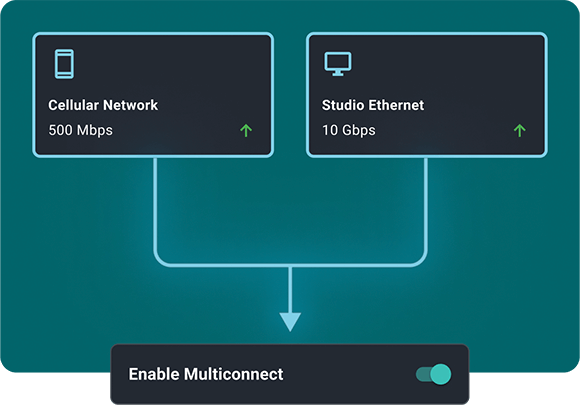
The company turned to MASV Multiconnect to significantly improve upload speeds and reliability in locations with poor connectivity, combining two Starlink dishes and a 5G hub to get dailies to editorial from a remote island.
“I saw what Multiconnect did, and I said: ‘Oh, wow. This is the answer.’”
Flexible upload Portals and no-code integrations
Using drag-and-drop MASV Portals to upload files means sending hard drives across borders is now a thing of the past. MASV Portals have essentially revolutionized the company’s file transfer processes.
“Somebody sends me an email, I click on it, put in the password. And it’s done,” the client explains. “All I need to do now is just drag and drop, and I know everybody’s going to get it at the other end.”
That MASV Portals are easily integrated with cloud storage has also been a big plus. The client now utilizes MASV’s Amazon S3 integration to get data to the cloud fast and easy.
“We’ve found MASV great for going straight into our S3 buckets compared to Media Shuttle’s protocol and how they do it, which seems slower.”
MASV cloud or on-prem integrations only need to be configured once and all content uploaded to that Portal automatically follows the preconfigured storage path, reducing friction and the chance of user error.

Web-based (not UDP) file transfer
UDP’s reputation as a network bully often causes it to be automatically blocked by many firewalls. But that’s not an issue with MASV web-based file transfer, which sends files via port 443 – the default HTTPS port for secure connections that don’t get blocked by firewalls.
Using MASV means the company doesn’t need to open or forward ports, deal with complex setup and configuration, reconfigure firewalls, install specialized hardware, or worry about dropped packets when sending large files.
It also means others on its network aren’t inconvenienced during large file transfers.
“MASV is an exceptionally good tool – it’s lightweight and easy to manage,” explains the client.
A user-friendly user interface
One of the biggest benefits is MASV’s dead-simple UI, which has practically eliminated hours of technical support for employees, clients, and other stakeholders.
“Anyone could set up a MASV Portal and be transferring content at high speeds in minutes without having any knowledge of the system,” he says. “That’s the major difference with MASV compared to every other file transfer solution we’ve used.”
It has also been a boon for the company’s remote operations. “One thing we don’t want is having to answer client calls every 10 minutes on how to use something, like getting someone started on Aspera.”
How to Determine the Best File Transfer Tool
Evaluate whether web-based file transfer or UDP is the right choice for your business.
The Result: ‘Stupidly Simple and Fast’ File Transfer Anyone Can Use
The company now enjoys more efficient, faster, and more reliable file transfer from anywhere without the headaches of a UDP-based solution.
“MASV is just stupidly simple and fast,” explains the client, adding that the relentless reliability of MASV helps staff feel “assured that it’s all working.”
But the main value, other than MASV’s ease of use, is the power and reliability of Multiconnect when files need to be uploaded on deadline – even from remote locations with no internet infrastructure at all.
“We were able to get 70 Mb/s up in the middle of a field with no connections other than just Starlink and some very small cellular coverage,” the client explains. “We turned it around very quickly, and there were no delays. We had it all up before they woke up.”

Build Smoother Workflows
Try MASV today for fast and reliable file sharing that just works.