
The best managed file transfer (MFT) workflow is one that keeps your data safe, secure, and compliant
Originally published: Feb. 12, 2024
Last updated: Jan. 19, 2026
In 2026, the challenge for digital project managers, DITs, post-production supervisors, and IT directors isn’t just moving data – it’s moving it without compromising the security, regulatory compliance, and data integrity of the organization.
But that’s easier said than done as file sizes balloon into multi-terabyte behemoths, workflows become more complex, and consumer-grade file sharing becomes a security and compliance liability.
In this post, we’ve evaluated the world’s best secure file sharing services to help you identify the strongest secure file transfer solution for your workloads. Let’s get started.
Table of Contents
- The 2026 Secure File Transfer Comparison
- Secure Transfer Evaluation Criteria
- The 15 Best Secure File Transfer Services
- 1. MASV: Best Intelligent MFT & High-Speed Ingest
- 2. Aspera: Best for Legacy Enterprise UDP Transfers
- 3. Signiant: Best for Managed Broadcast Fleets
- 4. Backblaze B2: Best for Secure Archiving & Ransomware Protection
- 5. Kiteworks: Best for FedRAMP & Zero-Trust Governance
- 6. GoAnywhere MFT: Best for Automated Server Orchestration
- 7. Citrix ShareFile: Best for Regulated Industry Client Portals
- 8. Tresorit: Best for Zero-Knowledge Privacy
- 9. Proton Drive: Best for Privacy-First Professionals
- 10. NordLocker: Best for File-Level Local Encryption
- 11. Box (Enterprise): Best for AI-Powered Governance
- 12. Dropbox (Enterprise): Best for Agency-Level Asset Protection
- 13. Microsoft OneDrive: Best for O3645 Ecosystem Security
- 14. AWS Transfer Family: Best for Developer-Centric Ingest
- 15. WeTransfer (Premium): Best for Low-Risk, Ad-Hoc Sends
- 1. MASV: Best Intelligent MFT & High-Speed Ingest
- The Security vs. Complexity Matrix
- Conclusion: Which Are the Best Secure File Transfer Services?
Secure Managed File Transfer for Media
The most secure and TPN Gold Shield verified cloud transfer solution for filmmakers sharing copyrighted content.
The 2026 Secure File Transfer Comparison
The following table categorizes each service by its primary strength, ranging from high-speed file transfer to zero-knowledge privacy, while highlighting any critical third-party certifications (like TPN Gold, SOC 2, and FedRAMP) that define the organization’s security posture.
| Service | Best For | Top Compliance Features | Top Security Features |
|---|---|---|---|
| MASV | Intelligent MFT & High‑Speed Ingest | TPN Gold Shield, SOC 2, ISO 27001 | AES‑256 & TLS 1.2/1.3, SAML SSO, MFA, RBAC |
| IBM Aspera | Legacy Enterprise UDP Transfers | FIPS 140‑2, SOC 2, ISO 27001, HIPAA | AES‑256, SAML SSO, MFA, AD & LDAP integration |
| Signiant Media Shuttle | Managed Broadcast Fleets | SOC 2, TPN Gold, ISO 27001, HIPAA | TLS & AES‑256, SAML 2.0 SSO, RBAC |
| Backblaze B2 | Secure Archiving & Ransomware Protection | TPN Blue, SOC 2, ISO 27001 | AES‑256, TLS, SSE‑C, Object Lock, RBAC, SSO, MFA |
| Kiteworks | FedRAMP & Zero‑Trust Governance | FedRAMP, FIPS 140‑3, NIST 800‑171, SOC 2, ISO 27001 | AES‑256 & TLS 1.2/1.3, SSO, MFA, RBAC, anomaly detection |
| GoAnywhere MFT | Automated Server Orchestration | FIPS 140‑2, SOC 2, PCI DSS, HIPAA | AES‑256, OpenPGP, SSL/TLS, SSO, RBAC, MFA |
| Citrix ShareFile | Regulated Industry Client Portals | HIPAA, FINRA, SEC, SOC 2, ISO 27001, PCI DSS | TLS 1.2/1.3, AES‑256, SAML SSO, MFA, RBAC |
| Tresorit | Zero‑Knowledge Privacy | ISO 27001, TISAX, NIS2, DORA, HIPAA, FINRA | Zero‑knowledge E2EE, RSA‑4096, SAML SSO, MFA, RBAC |
| Proton Drive | Privacy‑First Professionals | ISO 27001, HIPAA, SOC 2, Swiss privacy laws | Open‑source E2EE, OpenPGP, RSA‑4096, MFA, RBAC |
| NordLocker | File‑Level Local Encryption | SOC 2, ISO 27001, HIPAA, TISAX, PCI DSS | Zero‑knowledge AES‑256, XChaCha20, MFA, RBAC |
| Box (Enterprise) | AI‑Powered Governance | FedRAMP, GxP, FINRA, SOC 1/2/3, FIPS 140‑2, HIPAA | AES‑256, TLS 1.2/1.3, CMK, MFA, AI ransomware detection |
| Dropbox (Enterprise) | Agency‑Level Asset Protection | SOC 2, ISO 27001, FINRA, HIPAA | AES‑256, TLS 1.2/1.3, SSO, MFA |
| Microsoft OneDrive | O365 Ecosystem Security | SOC 2, ISO 27001, FedRAMP, HIPAA, FINRA | AES‑256, TLS 1.2/1.3, BitLocker, MFA, RBAC |
| AWS Transfer Family | Developer‑Centric Ingest | HIPAA, PCI DSS, SOC 2, ISO 27001, FedRAMP, FIPS 140‑2 | TLS 1.2/1.3, AES‑256, KMS integration, MFA, RBAC |
| WeTransfer (Premium) | Low‑Risk Ad‑Hoc Sends | GDPR, ISO 27001 | AES‑256, TLS 1.2/1.3, SSO, SCIM, MFA |

“Our standard is looking for membership in the TPN vendor roster. The studios we work with have familiarity with TPN, so I always look for that – if it doesn’t have that, it’s a non-starter.” – MASV customer Kevin Munro, CTO, Adapt
Our 2026 Secure Transfer Evaluation Criteria
We evaluated each service across four critical technical pillars to ensure we included the most effective secure large file transfer for enterprise:
- Compliance: We prioritized tools with third-party verified audits (such as SOC 2 Type II compliant file sharing, TPN, FedRAMP authorized file transfer services, and ISO 27001) over those without.
- Data integrity: We looked for tools that use a secure file transfer protocol, cryptographic hashing (like SHA-256 checksum verification), strong encryption, and other forms of data protection to ensure files aren’t corrupted or tampered with during transit.
- Identity and access management: We weighted tools higher if they offer SAML SSO file transfer integration and granular permissions, allowing IT to de-provision users instantly and centrally.
- Resilience at scale: Security often fails when users look for workarounds because a tool is too slow, so we tested each tool’s ability to keep data secure while efficiently moving 100GB-plus datasets.

How to Automate a Secure AI Data Ingest Pipeline
How to accelerate ingest to storage for model training while keeping data secure and compliant.
The 15 Best Secure File Transfer Services
Here are some of the most secure file transfer solutions on the market, along with some of their most noteworthy security features.
Category A: High-Performance Media & Big Data

1. MASV – Best Intelligent MFT & High-Speed Ingest
- Why We Picked MASV: While traditional MFT systems are notoriously rigid and require significant IT overhead, MASV – hey, that’s us! – provides an intelligent managed file transfer (IMFT) alternative that combines TPN Gold Shield secure file transfer with extreme speed and reliability. MASV is one of the only 10Gbps file transfer solutions on the market and focuses on automation and reliability to satisfy stringent compliance requirements.
- Pros: No file size limits; zero IT setup; relentless reliability (automatic retries and checkpoint restart); no-code automation (via Portals and Watch Folders).
- Cons: Optimized for high-speed transit and automated workflows rather than real-time document co-editing.
- Competitive Edge: MASV’s no-code integrations ensure sensitive IP and huge files move directly from a secure portal to integrated on-prem or cloud storage, bypassing the risks of local workstation exposure, and browser-based Portals offer a simple and accessible way to upload files. For a deep dive into MASV’s enterprise-grade security and compliance posture, visit the technical security features page.

“We at MASV believe in a shared responsibility model. And on the architecture side, we always think about a cloud layered security approach to protect our employees, our product, and our customers. That starts with security awareness training for every employee.” – MASV CTO Majed Alhajry

2. IBM Aspera – Best for Legacy Enterprise UDP Transfers
- Why We Picked Aspera: Aspera’s patented FASP protocol remains a legacy standard for high-latency global links in massive organizations.
- Pros: Exceptional performance over long-distance, high-latency networks.
- Cons: Significant IT overhead; requires software plugins and firewall adjustments.
- Competitive Edge: Aspera is a powerhouse for fixed infrastructure, but modern teams often find cloud-native transfer platforms a faster, more reliable alternative with far less IT overhead and configuration.
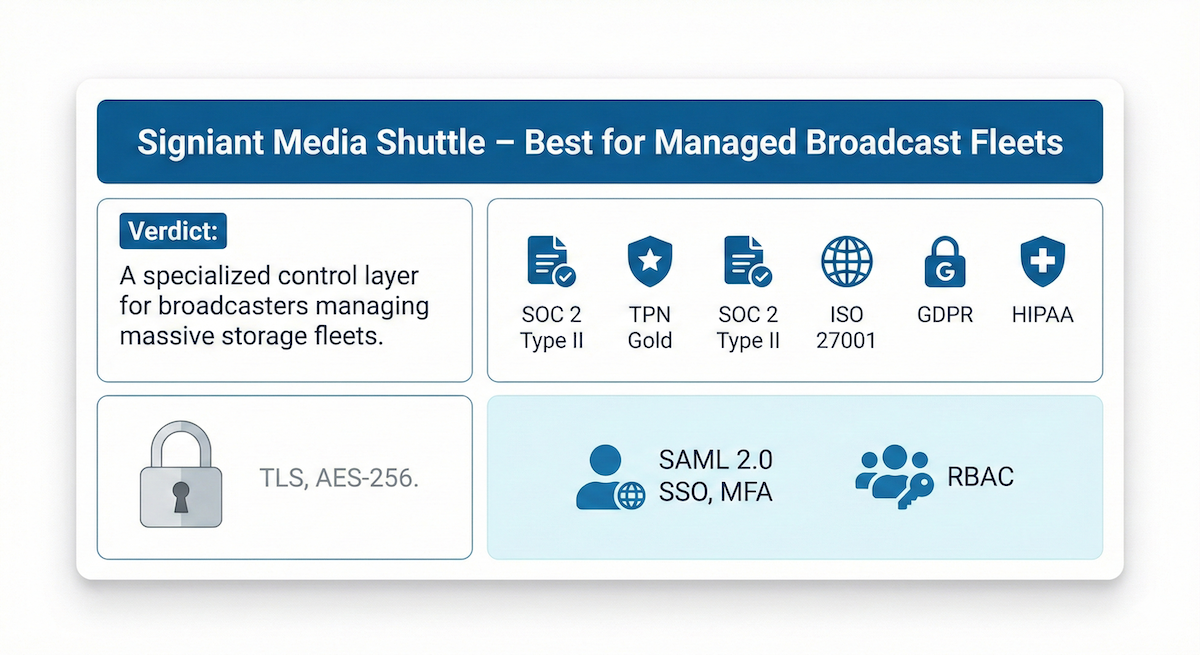
3. Signiant Media Shuttle – Best for Managed Broadcast Fleets
- Why We Picked Signiant: Signiant allows large organizations to maintain storage independence while acting as a secure control layer.
- Pros: You retain 100 percent control of your storage location.
- Cons: Requires annual contracts and far more setup and configuration than pure SaaS tools. Typically requires additional hardware.
- Competitive Edge: Signiant excels at facility-to-facility links. For ad-hoc external vendor sends, studios often prefer cloud-native IMFT.

4. Backblaze B2 – Best for Secure Archiving & Ransomware Protection
- Why We Picked Backblaze: Backblaze offers the best safety net for secure storage through Object Lock immutability.
- Pros: Lowest cost for high-durability storage; TPN assessed.
- Cons: Requires a third-party tool (like MASV) for high-speed ingest.
- Competitive Edge: Immutability. If hit by ransomware, Object Lock ensures master assets remain untouched.
Category B: Enterprise Governance & Regulated Industries

5. Kiteworks – Best for FedRAMP & Zero-Trust Governance
- Why We Picked Kiteworks: Kiteworks provides a hardened private content network that meets the highest FedRAMP and FIPS requirements.
- Pros: The highest level of governance for defense and government sectors.
- Cons: High complexity and licensing costs for media-centric workflows.
- Competitive Edge: If you require FedRAMP, Kiteworks is an excellent choice. But it’s not as suitable for fast, reliable, automated delivery of multi-terabyte assets to storage or other platforms.

6. GoAnywhere MFT – Best for Automated Server Orchestration
- Why We Picked GoAnywhere: GoAnywhere represents the pinnacle of MFT orchestration for complex, multi-step server movements.
- Pros: Robust automation engine; centralized control of internal file movements.
- Cons: Steep learning curve for orchestration; requires significant IT maintenance.
- Competitive Edge: GoAnywhere moves, verifies, and triggers secondary actions (such as database updates) automatically. However, other platforms (like MASV) can be integrated with data orchestrators to perform similar functions.

7. Citrix ShareFile – Best for Regulated Industry Client Portals
- Why We Picked ShareFile: ShareFile pioneered the concept of secure client portals for legal and financial firms to safely exchange sensitive documents.
- Pros: Built-in e-signatures; incredibly simple for external clients.
- Cons: Aging UI; not optimized for large media assets.
- Competitive Edge: Branded portals increase client confidence and data security during tax or legal document uploads.
Category C: Zero-Knowledge & Privacy-First

8. Tresorit – Best for Zero-Knowledge Privacy
- Why We Picked Tresorit: Tresorit prioritizes absolute privacy through zero-knowledge, end-to-end encryption.
- Pros: “Zero knowledge” means total privacy from the service provider.
- Cons: Large file uploads (100GB+) can be significantly slower due to E2EE overhead.
- Competitive Edge: Ideal for documents and sensitive legal folders.

9. Proton Drive – Best for Privacy-First Professionals
- Why We Picked Proton: Proton makes the individual user’s privacy the core product.
- Pros: Open-source (auditable); completely private from the provider.
- Cons: Limited enterprise-level workflow automation.
- Competitive Edge: Open-source code allows verification that no back doors exist.

10. NordLocker – Best for File-Level Local Encryption
- Why We Picked NordLocker: NordLocker creates encrypted lockers on local drives before syncing, protecting data on hardware – even if the hardware is stolen or lost.
- Pros: Intuitive lockers for data on local drives; zero-knowledge architecture.
- Cons: Lacks enterprise-grade portals for receiving external files.
- Competitive Edge: Encryption at the source reduces the blast radius if a cloud account is compromised.
Category D: General Business Cloud & Collaboration

11. Box (Enterprise) – Best for AI-Powered Governance
- Why We Picked Box: Box has evolved into a content cloud service that uses AI to detect ransomware and unusual access patterns.
- Pros: Strong governance controls; zones capability for meeting data residency laws.
- Cons: Expensive add-ons for security modules.
- Competitive Edge: Box Shield proactively warns of any behavior that looks like data exfiltration, rather than just protecting files.

12. Dropbox (Enterprise) – Best for Agency-Level Asset Protection
- Why We Picked Dropbox: Dropbox Enterprise balances professional-grade security and file syncing with the usability creative agencies demand.
- Pros: Industry standard UI; Delta Sync for file synchronization.
- Cons: No TPN status; slower and less reliable than other tools for files over 100GB.
- Competitive Edge: Users rarely bypass Dropbox for personal tools because of their familiarity with it for syncing files and other tasks, reducing shadow IT risks.

13. Microsoft OneDrive – Best for O365 Ecosystem Security
- Why We Picked OneDrive: OneDrive’s greatest security strength is its proximity to the Microsoft Entra ID (formerly Azure AD) identity layer.
- Pros: Native integration with O365; personal vault for file-level MFA.
- Cons: Known for sync problems with large folders; individual file limits (250GB) can cause productivity issues.
- Competitive Edge: Governance at scale, ensuring confidential labels prevent external emailing regardless of user intent.

14. AWS Transfer Family – Best for Developer-Centric Ingest
- Why We Picked AWS: The AWS Transfer Family is suitable for teams that need a direct-to-S3 pipeline without managing server infrastructure.
- Pros: Infinite scalability; no servers to patch or maintain.
- Cons: Developer-only; no interface for non-technical employees; can be difficult to use and easy to make ingest mistakes using the AWS Console.
- Competitive Edge: Data stays within the AWS secure perimeter from the moment it hits the endpoint.

15. WeTransfer (Premium) – Best for Low-Risk Ad-Hoc Sends
- Why We Picked WeTransfer: WeTransfer boasts a simple, easy-to-use way to share files and its Premium tier offers basic encryption for low-risk creative collaboration.
- Pros: No account required for recipients; ease of use.
- Cons: Lacks high-level compliance (TPN/FedRAMP), cloud integrations, and transfer automations.
- Competitive Edge: For a mood board or social media edit, WeTransfer’s frictionless nature can be a practical choice.

“Anything our producers need, they just send one simple MASV link to the videographer, and the content will go directly into the producer’s project. And I’m the only one that has access to the S3 bucket, so it’s nice and secure.” – MASV customer Thomas Smith, Senior Video Editor, CGI Digital
The Security vs. Complexity Matrix
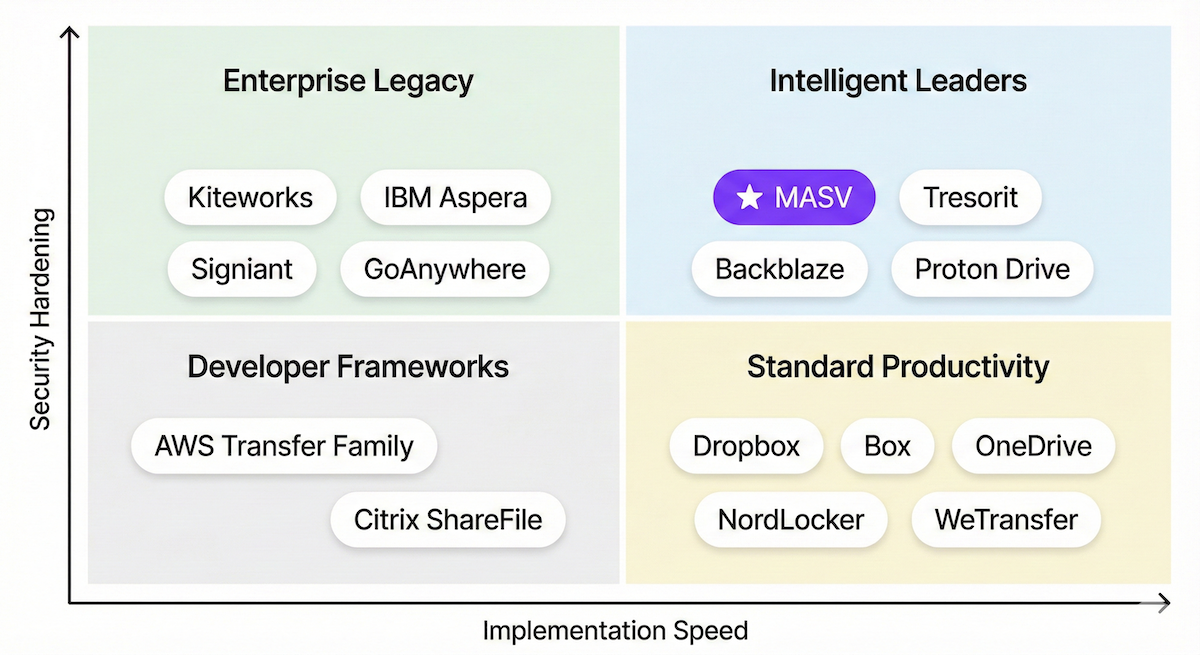
The relationship between security hardening (compliance and encryption depth) and ease of use and implementation is as old as technology itself:
- Too few security features leave your system woefully exposed.
- But too rigorous a security posture can impede productivity, forcing employees into workarounds and shadow IT solutions.
Here’s a visual representation of how each service stacks up when it comes to security vs. ease of use:
Conclusion: Which Are the Best Secure File Transfer Services?
Every service on this list provides robust security, but the best choice depends entirely on your specific needs:
- Choose MASV if you need an intelligent MFT platform that moves massive, sensitive datasets without file size limits or a heavy IT burden around implementation and management. It is the only solution that combines TPN Gold Shield compliance with industry-leading speed and relentless reliability.
- Choose Kiteworks or Aspera if you are a government contractor or a global enterprise with a fixed, high-latency infrastructure that requires on-premises hardware and specialized IT management.
- Choose Tresorit or Proton Drive if your primary goal is absolute individual privacy and zero-knowledge protection of sensitive legal or financial documents.
- Choose Box or OneDrive if you’re looking for a general-purpose content cloud to manage your organization’s daily document lifecycle and internal collaboration.
Sign up for MASV for free to start sending files securely right away, or talk to a workflow expert to learn how MASV’s intelligent MFT features can make your file transfer and management workflows more efficient, secure, and compliant.
MASV File Transfer
Fast, secure, and easy file transfer for large files and video workflows.