
The use of edge devices in the field helps reduce latency and cloud costs for live streamers and recorders of live media. But getting content from these devices and into asset management, video editing, or storage is typically a manual process that requires the use of insecure FTP technology or removable storage. This can introduce security issues and significant delivery delays.
Fortunately, the team at Bridge Digital has discovered a straightforward and automated solution by combining the MASV API with the LiveEdge Developer tools.
In this guide, we present an overview of Bridge Digital’s automated camera-to-cloud workflow that shows how MASV can be implemented on hardware that doesn’t have accelerated file transfer functionality.
This workflow enables live technicians to effortlessly offload encoded footage from video edge devices directly into asset managers such as Frame.io or to specific individuals. It is deployed on the Videon LiveEdge Node, an edge device capable of both compute and encode.
This workflow has been provided by Richie Murray, a media workflow technologist and President/Founder of Bridge Digital, a technology integrator with expertise in digital video workflows.
Table of Contents
- An Alternative to Sneakernet
- Looking For a File Uploading Solution
- MASV Ticked the Right Boxes
- Application Architecture
- MASV-Edge Device Workflow Diagram
- What Are Edge Devices for Live Video?
- How MASV and Edge Devices Can Work Together
- Why Use MASV and Edge Compute Together?
- How Edge Compute for Live Video Benefits From MASV
- Inside Bridge Digital’s Automated Camera-to-Cloud Workflow
- Frictionless, Fast Uploads to the Cloud from Video Edge Devices
MASV Large File Transfer
Get some free data when you sign up for MASV, the fastest, most secure file transfer service on the planet.
An Alternative to Sneakernet
For M&E customers who need to get footage directly from cameras, Bridge Digital recommends Videon LiveEdge Node. It’s a portable, cost-efficient, low-latency, edge computing device that records footage from its digital video inputs and encodes it for transferring.
The LiveEdge Node by itself already solves an obvious camera-to-cloud problem: media companies can avoid the delays and extra cost of paying someone to physically monitor then carry storage media from cameras to a network connection for uploading.
As an edge computing device, LiveEdge Node has the extra flexibility of the LiveEdge Developer Program, a suite of developer-centric features that include a REST API and support for hosting Docker containers. LiveEdge Node runs the Android operating system, a feature-rich platform that makes the best use of the LiveEdge Node’s resources.
Looking for a File Uploading Solution
When Bridge Digital wanted to add cloud file uploading to LiveEdge Node, it looked for a solution that met these requirements:
- Security and reliability: The solution should adhere to industry-standard security practices and should recover gracefully from mid-stream failures. For example, LiveEdge Node provides FTP transfers, but FTP is inherently insecure. Also, a transfer error means re-sending the whole file.
- Scalable: Some workflows involve several LiveEdge Node devices. The solution should make it easy to configure all devices for a given event, set of vendors, and so on.
- Support for multiple cloud services: Bridge Digital’s customers deal with a variety of vendors who rely on different providers for cloud storage and media workflow.
- Low impact on resource usage: Uploading to multiple endpoints should not affect the device’s streaming and encoding performance.
- Support non-technical users: A user-friendly interface for managing transfers, collaboration, automation, and integration with other services.
- Big file sizes: Media files aren’t light. Bridge Digital customers need to upload big files with confidence.
- Communications tools: Users need to know when files are ready.
MASV Ticked the Right the Boxes
MASV turned out to be the right choice for a file upload API:
- MASV is already proven in the media and entertainment industry. It’s a member of the TPN vendor roster and transfers are fast, with relentless reliability powered by infinite auto-retries and checkpoint restart.
- Anyone can use it. MASV provides a user-friendly, point-and-click interface that lets non-technical users manage file transfers, cloud integrations, and automation tasks.
- One configuration, many devices: Several LiveEdge Node devices can use a single MASV account. There’s no need to hard wire specific cloud endpoints for each of the workflow tasks that need to receive recorded media.
- One transfer, many cloud uploads: With a single upload from the LiveEdge Node to the MASV cloud, users can easily set up one-to-many transfers to a growing list of services for cloud storage and media management.
- Scalable: The MASV cloud will never run out of bandwidth because it’s backed by AWS.
- Huge files: MASV handles files packages of unlimited size. It’s also fast at uploading hundreds of thousands of files in a single transfer.
- MASV automatically notifies users by email, and integrates with productivity tools like Slack.
- Integration is easy. The MASV API is a RESTful API that lets your application send or receive packages without size limits or subscriptions. It’s designed to let applications efficiently saturate a network connection and recover quickly from errors.
Application Architecture
Bridge Digital designed and developed its own application to run locally on the LiveEdge Node device to act as the bridge between the LiveEdge Node and the MASV cloud.
Bridge Digital kept its design as straightforward as possible, implementing its app in the Go programming language running the LiveEdge Node in a Docker container. Video captured from the LiveEdge Node’s input follows this path:
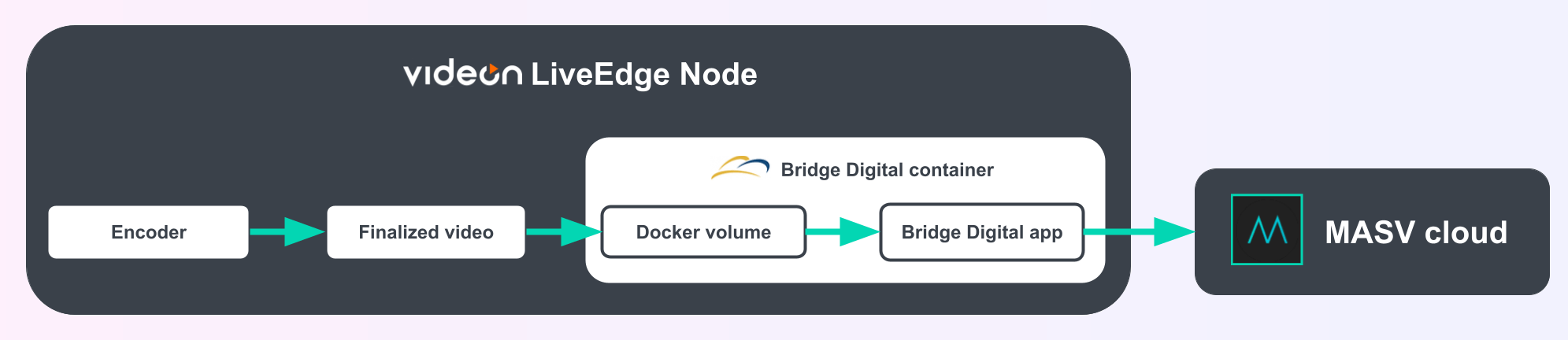
- Encoder: LiveEdge Node encodes footage into the formats needed for streaming, editing, and so on.
- Finalized video: LiveEdge Node stores the finalized media in a local folder.
- Docker volume: The container-local folder that gives access to the LiveEdge Node’s finalized video.
- Bridge Digital app: Uses the MASV API to upload to the MASV cloud.
- MASV cloud: MASV takes over, using its own high-performance networking and storage infrastructure to get files to cloud providers and collaborators.
Because LiveEdge Node uses Android, Bridge Digital had to use the MASV API itself. But for Windows, macOS, and Linux, MASV recommends using the MASV Agent. It abstracts the MASV API for uploads and downloads to simplify integration.
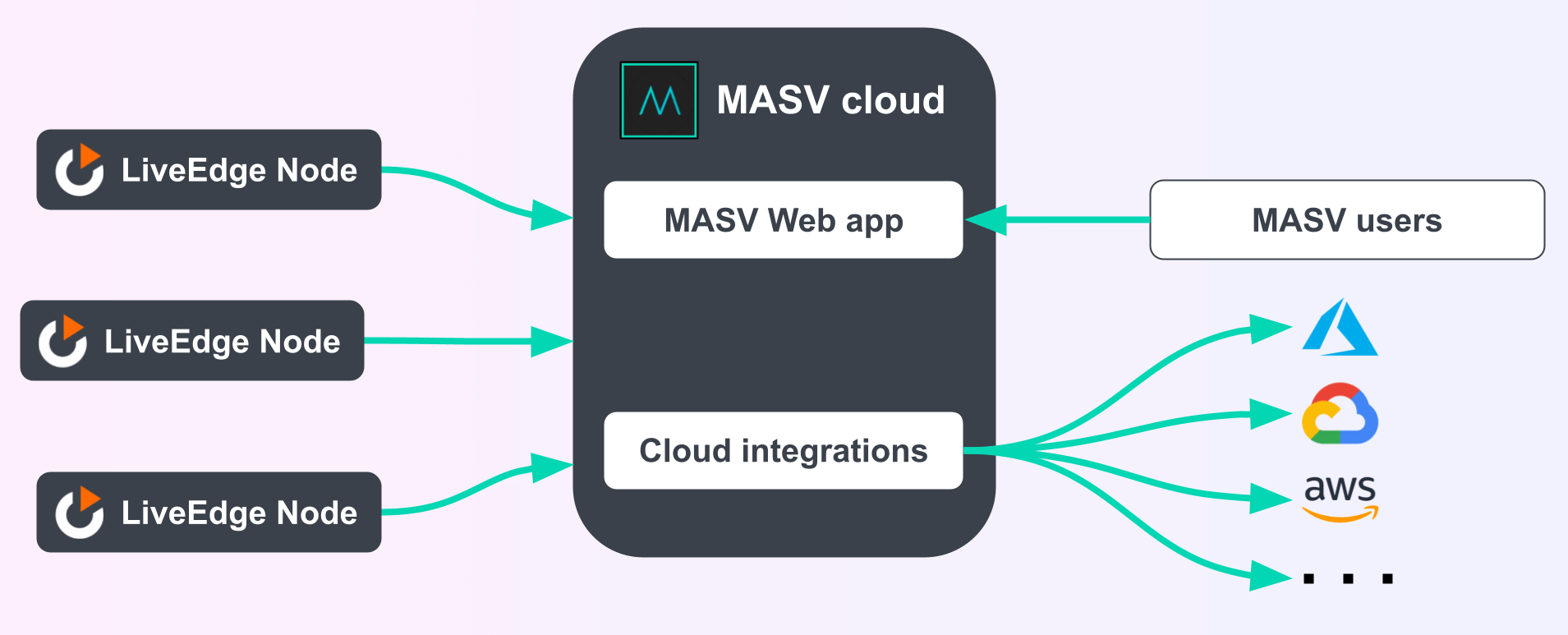
MASV-Edge Device Workflow Diagram
What Are Edge Devices for Live Video?
Edge computing technologies and encoding devices for live video recording leverage processing at the point of video production for fast video encoding, reduced latency, multi-camera synchronization, AI/ML capabilities, and other benefits.
This helps organizations reduce their hardware footprint, cloud costs, power and cooling requirements, and the need for on-site technical staff via remote orchestration and other tools.
Videon’s ecosystem of edge technologies, specifically, is an example of an an edge compute device that supports container-based processes, including encoding and Docker. It provides live video creators with the equivalent of an on-site Amazon EC2 instance capable of running tasks locally in Docker containers.
LiveEdge Compute (which provides scalable, container-based edge computing) and Cloud Control (remote orchestration and monitoring) are the primary elements used in this workflow, along with LiveEdge Node hardware powered by an Android OS and Qualcomm SnapDragon ARM processing.
How MASV and Edge Devices Can Work Together
MASV partner Bridge Digital has developed a frictionless workflow to automatically get content from camera to the cloud for storage, video editing, and collaboration.
- On-premises compute hardware replaces encoders with edge compute capabilities that can capture, store, and stream on-site live video.
- MASV can automate content uploads from these devices to the cloud or other recipients, allowing for automated video uploads from remote locations and sets – even before the file has been finalized.
This allows for automated delivery of captured camera media to any of the 25+ preconfigured cloud distribution points already set up within MASV, or to the recipient of your choice.
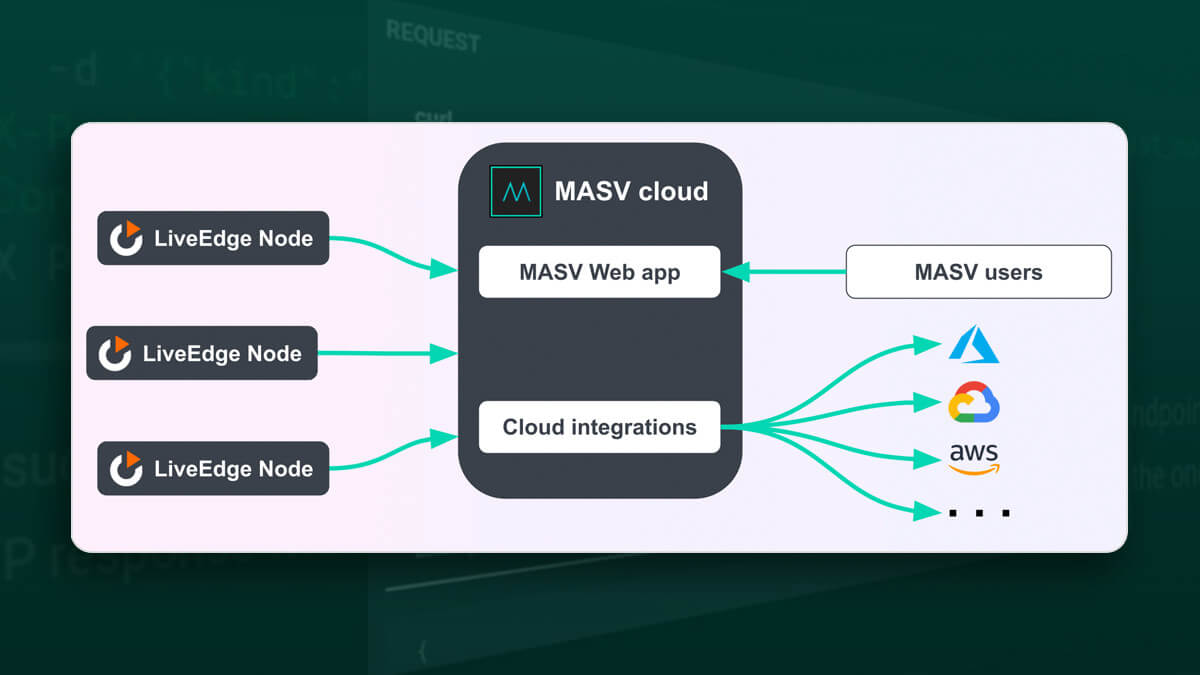
Using MASV as a File Uploader for a Camera-to-Cloud Application
How developers can use MASV as a file uploader in their camera-to-cloud workflows.
Why Use MASV and Edge Compute Together?
Edge devices with compute capabilities power live video workflows through features like remote camera control and dynamic graphic overlays on live streams in real-time.
But moving media out of edge hardware and into cloud or other storage is a manual process involving downloading the files and re-uploading them to cloud platforms (or shipping hardware to the video editing team), which adds extra costs and time to every project.
Additionally, most edge compute devices and encoders aren’t compatible with Frame.io, Amazon S3, or similar cloud platforms.
And that’s where MASV comes in:
- MASV already has no-code cloud integrations in place with more than two dozen cloud storage and media asset management (MAM) platforms including Frame.io, S3, iconik, MediaSilo, Premiere Pro Panel, Slack, Backblaze B2, and Wasabi Cloud Storage.
- MASV users can set up an unlimited number of MASV secure file sharing Portals for free. MASV Portals are an upload window unique to you, and each Portal can be configured to point at a specific cloud platform or recipient with just a couple of clicks.
- The workflow also capitalizes on MASV’s fast and reliable cloud-based large file transfer technology, no-code automated file transfers, and other advanced file sharing features.
How Edge Compute for Live Video Benefits From MASV
Combining edge tools for live video and MASV’s powerful file transfer integrations and automations lets your live video workflow sing by removing several manual steps, improving turnaround time for the entire video team.
That means whoever’s working a live stream or other recorded media can focus on creating the best recording possible, while MASV automates the media’s distribution to multiple locations at the same time quickly.
The integration provides several benefits:
File transfer automations
MASV allows users of Dockerized edge devices to automatically upload huge video files to the cloud without coding – or any significant effort at all. There are no native file transfer automation tools associated with edge devices for live video.
Preconfigured cloud destinations and capabilities
There’s no need to individually configure every device to point to specific cloud destinations. Once the content is uploaded to a MASV Portal, users gain access to all of MASV’s cloud integrations, automations, and other file transfer features.
File transfer performance
Remote video editing or post-production teams can access content from the edge faster thanks to MASV’s superiority to FTP and other file transfer methods. MASV facilitates large file transfer speeds of up to 10Gbps and allows users to combine multiple internet connections for even faster speeds.And because MASV’s global accelerated network doesn’t depend on the quality of the outbound internet, it can even improve live stream bitrates.
MASV users can also start the upload process for in-progress video files early thanks to MASV’s Growing Files feature, which trims upload times even more by allowing expensive technical on-site staff to wrap up earlier. MASV relentlessly retries every file transfer until the upload goes through, so users never have to start their transfers from scratch.
Note: The limiting factor when live streaming in most cases is based on outbound internet bandwidth – but MASV can match or exceed the speeds of most local internet connections anywhere in the world.
File transfer communications tools
MASV’s file transfer communications tools alert users to the status of a file transfer in real-time for greater visibility into media being recorded and distributed from the edge. MASV’s centralized file sharing management tools allow administrators to monitor file transfer status, and users receive email notifications when uploads are complete or when a recipient has downloaded an asset. Edge devices for live video typically rely on a command-line interface and don’t allow users to easily check media or transfer status.
File transfer security
Edge device users also benefit from MASV’s out-of-the-box file transfer security features and compliance standards, such our underlying AWS infrastructure, AES-256/TLS 1.2 encryption, and secure authentication and privacy controls. There are no native, cloud-based secure file transfer capabilities associated with edge devices for live video.
Ease of use
MASV is as user-friendly as it gets, with a drag-and-drop interface that makes sending large files as easy as sending an email.
Inside Bridge Digital’s Automated Camera-to-Cloud Workflow
Using Bridge Digital’s edge compute-MASV workflow, users can record files locally and automatically push them into any preconfigured distribution point already set up within MASV.
Here’s how it works:
- Users must first have a MASV account (you can sign-up for free).
- The edge device runs a Bridge Digital application in a Docker container. Containerizing the application helps smooth the development process and provides better control.
- The Bridge Digital application uses the MASV API to automatically upload video content to a MASV Portal attached to the MASV account.
- The MASV Portal is configured to automatically send video assets to one of MASV’s preconfigured cloud destinations.
Organizations with multiple simultaneous projects can create multiple MASV Portals for free, and configure each Portal to point at the cloud destination or recipient of your choice.
Through these configurations, hardware encoders and edge devices can use MASV to automatically distribute video content to the cloud – taking advantage of MASV’s high-speed content delivery network, security, reliability, and cloud integrations.
Frictionless, Fast Uploads to the Cloud from Video Edge Devices
MASV’s performance and advanced file sharing features combined with edge compute for live video can save live streamers and recorders of live media hours when uploading video assets on location.
Bridge Digital says integrating MASV with the Videon LiveEdge Node was easy, and that MASV’s powerful cloud-based file sharing tools remove all of the heavy lifting involved in getting content out of edge devices and into cloud storage or other destinations.
If you work with live video using edge devices and have questions or would like assistance in implementing this workflow, please reach out to Bridge Digital. Bridge Digital is a reseller partner of both MASV and Videon.
You can also sign up for MASV for free right now.
This post was originally published April 1, 2024 and updated April 16, 2026.
MASV Large File Transfer
Use the fastest, safest file transfer service available today, MASV.