
How to use next-gen transfer technology, like growing files, to empower your analytics team before the final buzzer sounds
The moment a game ends, the next stage of the competition begins as analysts and coaches race to extract actionable insights. In pro sports, generating actionable intelligence through the sport analytics workflow is a major competitive advantage.
But achieving such data velocity isn’t easy. Modern analytics platforms run on real-time pipelines, computer vision, optical data tracking, and multi-cam setups at practices and games, which can lead to significant data movement challenges.
That’s why we’ve produced this handy guide breaking down the seven essential steps of a modern sports video analytics workflow, and revealing why data transfer remains the most troublesome bottleneck in the pipeline – until now.
Game on.
Table of Contents
Move heavy sports files as they're being recorded
Get your analytics team a head start: Use MASV Growing Files to start transferring files as they’re still being written.
What is the Sport Analytics and Scouting Workflow?
A sports analytics workflow is the end-to-end process of capturing, transferring, processing, analyzing, and distributing game footage and player data to enable faster, smarter decisions by team staff.
In such a data analytics workflow, speed is everything. That’s because shaving hours off game or practice film delivery translates into more preparation time, sharper scouting reports, and better-informed roster decisions.
The stakes are high: Pro sports teams require fast turnaround times, from real-time (for game-day video) to hours (for immediate post-game video and deep-dive postgame analysis).
It’s no wonder that growth projections for the sport analytics market anticipate the industry to be worth approximately $4.75B by 2030.
To keep up, the sports industry at every tier – from NFL, NHL, MLB, NBA, and MLS franchises to Premier League clubs and college athletics – have invested heavily in sophisticated analytics and data infrastructure to handle two main use cases:
- In-venue, real-time workflows covering game-day video including sideline tablet review, live video tagging, and instant replays for analysis. These run on closed, wired systems in a controlled environment.
- Off-site delivery workflows covering the transfer of game or practice files to remote analytics staff, scouting departments, and cloud platforms after the final whistle (and from those remote locations back to club decision-makers).
The latter use case – off-site delivery – is where most organizations still struggle, and where the most significant optimizations are possible using modern, intelligent file movement.
Sports Data Analytics Workflow Steps
Data analytics in sports now involves a deep workflow typically consisting of seven steps:
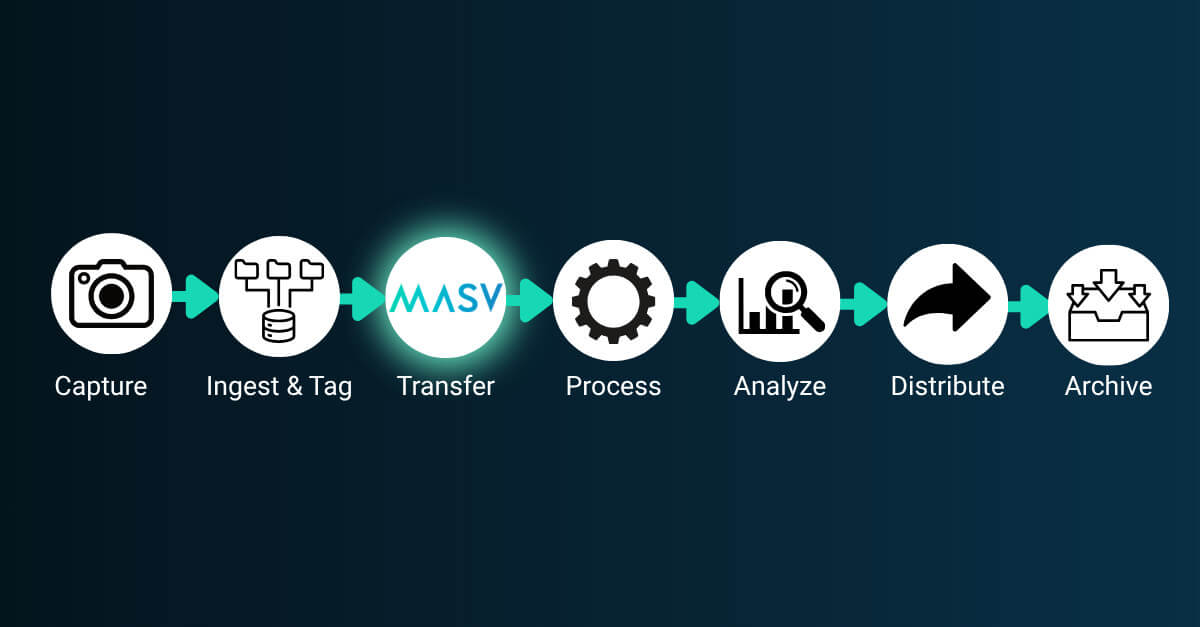
Step 1: Video and data collection
Every winning analytics workflow starts with great footage. Modern pro sports venues deploy sophisticated multi-angle camera setups including endzone camera angles, sideline rigs, all-22 film views, and IP-connected 4K pan-tilt-zoom (PTZ) cameras that can be remotely operated and repositioned in real time.
Some NFL and NBA venues even use volumetric video from providers like Cosm and Canon. Cosm’s technology displays games in an 87-foot-diameter 12K-plus LED dome, while the Canon Free Viewpoint System uses more than 100 4K in-stadium cameras.
While volumetric video is often used for fan engagement and sports broadcasts, it’s also leveraged by analytics teams. Some pretty heavy files there, we’d say.
Footage comes in a mix of file formats, including MXF file format, MOV, and MP4 containers encoded with ProRes 422 HQ, H.264, or HEVC codecs depending on use case and downstream requirements.
- The resulting data footprint is significant: Exact volumes vary by sport, resolution, and number of camera angles, but multi-camera captures at the professional level routinely reach hundreds of gigabytes per game of video footage alone.
- A typical NFL game, for example, produces multiple terabytes – and in the case of volumetric capture, tens of terabytes – of raw data.
Teams also collect player tracking data generated from wearable technology and optical/skeletal tracking systems such as Hawk-Eye tracking, Kinexon Sports, or Second Spectrum.
Video and data analysis platforms like Catapult capture biomechanical and spatial data to identify patterns and gauge athletic performance metrics like player load, max velocity, high-intensity efforts, and sprint distance.
Step 2: Ingest & organize
Once all that video and sports performance data is captured, organizations need to ingest it into storage and applications while ensuring everything stays organized while adhering to the tight timelines we mentioned earlier.
- Inside the venue, SMPTE hybrid fiber cables connect cameras directly to camera control units (CCUs), which are connected to switching stations that allow staff to route video to internal departments or personnel.
- Video is then sent to ingest servers and analytics software to allow coaches and analysts to tag, sync, and review. The server writes these files to high-performance shared storage while pushing lightweight proxies to the cloud (for remote staff to view footage in close to real time).
While all this is happening, video personnel tag specific plays on the fly and cut quick-turnaround packages faster than most people can make a sandwich (the sports analytics workflow isn’t 100% linear, and many steps happen in tandem).
While real-time sideline systems solve the in-game coaching problem brilliantly, however, the full multi-angle game file still has to make it out of the venue efficiently. That’s where most workflows can hit a wall.
Off-site ingest
Video teams must also prepare, ingest, and distribute the full, high-resolution game file – and unfortunately, this is where plenty of sports analytics workflows can have issues.
- Video staff must tag and log every angle, assign metadata, and organize footage by camera view or play type.
- The heavy game file must then be transferred to the team’s on-prem storage at headquarters.
- Footage sent to HQ can then be moved into a media asset management (MAM) system like ScorePlay, Frame.io, or Iconik, so it can be used by social media teams or shared with the league (a requirement in most cases).
Step 3: Transfer
The transfer challenge is real: full multi-angle game files, performance tracking systems exports, and tagged clip packages need to reach remote analytics staff, scouting departments in other cities, external partners, cloud platforms, and other destinations. They need to arrive fast, securely, and reliably – even when your team is on the road.
Transfer isn’t just for game and practice video: Scouts on the road capture vital prospect video, which must also seamlessly make its way into team systems.
Pro sports teams use a variety of methods to get massive game files out of venues (typically with spotty internet). Here’s a cross section of the tools used by most pro sports teams right now:
| Transfer method | What it does well | Where it falls short for off-site delivery |
|---|---|---|
| Intelligent managed file transfer (MASV) | Near-real-time transfers to any destination; no-code automation and storage integration; bonded internet; minimal setup and automatic retries in case of interruption | Doesn’t offer real-time live streaming |
| Fiber optic (in-game sideline) | Instant clips to coach tablets during the game | Closed system that doesn't solve off-site delivery |
| P2P private leased lines / MPLS | Private, uncongested transfers between stadium and team HQ | Only works between fixed locations; not useful for away games or remote teams |
| Legacy MFT (UDP) | Moves large files quickly to external recipients | Expensive enterprise licenses, per-set fees, and infrastructure investments; requires open ports and firewall reconfigurations |
| Cloud analytics platforms (Catapult, Hudl) | Seamless auto-upload within the vendor ecosystem; some platforms automatically create cloud proxies | Platform-locked: can't easily share outside the ecosystem; dependent on venue internet quality |
| Live video transmission (Haivision, LiveU) | Bonds internet signals for fast and reliable real-time live streaming | High cost per GB leads most teams to only use it for smaller proxy clips |
| FTP | Inexpensive, relatively fast local transfers | Technical setup and outdated UI; no encryption by default; unreliable over long distances; requires firewall reconfigurations |
| Sneakernet (physical hard drives / SSDs) | No internet dependency; handles any file size | Slow, risk of loss or damage, doesn't scale |
| Consumer cloud (Google Drive, Dropbox, WeTransfer) | Familiar; low/no cost for small files | Restrictive file size limits; slow and unreliable for large uploads |
Intelligent managed file transfer (IMFT) like MASV can improve the efficiency of this crucial step.
IMFT handles file transfers of virtually any size over any internet connection with relentless reliability, thanks to checksum file verification and checkpoint restart with infinite auto-retries in case of transfer interruption. Its support for growing files is a particular game-changer: video coordinators can begin uploading footage while it’s still being recorded, meaning remote analytics staff can start working on first-half footage before the second half even kicks off.
Video teams can combine MASV Growing Files with MASV Express, which allows analysts to begin downloading the file to local or cloud storage before the upload even finishes for real-time transfer workflows.
- MASV Multiconnect channel bonding takes these speed and reliability benefits even further, bonding multiple internet connections simultaneously to maximize upload throughput regardless of venue.
- Native cloud integrations with 25-plus cloud and on-prem storage destinations deliver footage directly into your sports analytics pipeline; no-code automation eliminates manual file transfer steps.
- MASV Portals give scouting departments a standardized, branded upload point for prospect footage from scouts anywhere in the world.
- All transfers are encrypted in flight (TLS 1.2/1.3) and with AES-256 encryption at rest, with ISO 27001:2022 and SOC 2 Type II- compliant data protection.
It all runs from a browser or powerful Desktop App that doesn’t require complex installs or firewall tweaks. It’s simple enough to operate under game-day pressure without training or endless technical calls.
Here’s what that looks like in practice:
- It’s the third quarter of an away playoff game. Your video coordinator has already started uploading the first-half multi-angle file via a MASV Growing Files transfer.
- By the time the final buzzer sounds, your analytics team back at headquarters has worked on the footage for over an hour.
- When the team bus reaches the airport, the full game file is already delivered, analyzed, and ready for morning review.
Step 4: Process & encode
Once files have landed, footage must then be transformed into something an analyst can work with. The processing and encoding process is typically ongoing as footage arrives during and after the game.
First up is transcoding sports footage. Professional camera formats like ProRes and MXF are huge – not ideal for analysts who need to scrub through 12 camera angles at 2 a.m. before a Thursday night game. By transforming raw data into analysis-friendly formats optimized for downstream platforms, organizations balance quality with usability.
From there, the processing pipeline typically covers:
- Multi-camera sync: Aligning every camera feed to a common timestamp so analysts can switch between views of the same play without losing their place (or their minds).
- Sensor and tracking data integration: GPS, optical tracking, and biometric feeds are married to video timestamps, so a spike in a player’s load data lines up with the video.
- Clipping and segmentation: The full game file is broken down into possessions, plays, and sequences.
- Tagging: Traditionally performed manually, machine learning and AI-automated play tagging software can identify formations, play types, personnel groupings, and other game strategies at scale, reducing the manual burden on analysts.
The platforms doing this – including ScorePlay, Hudl, Catapult, Dartfish, or custom internal tools – have become the analytical boiler rooms of modern sports organizations.
Step 5: Analyze
After all the capturing, hauling, and processing, the footage and data are finally in the hands of the people paid to find data-driven insights hiding in plain sight.
Modern sports video analysis spans a wide and interconnected ecosystem of platforms and data sources:
- Tactical and team performance platforms: Tools like Hudl video analysis and Catapult sports analytics power film review and player performance analysis, from breaking down opponent tendencies to monitoring individual player output.
- Live and contextual data: Platforms like SofaScore or Soccerway feed analysts a continuous stream of statistical data like live scores, lineups, standings, heat maps, player ratings, and scouting data.
- Financial and valuation intelligence: Tools like Capology and Transfermarkt bring the business side of the game into the analytical picture. Knowing a player’s market value before contract talks is vital intelligence for front offices.
The analysis happening across these tools are equally broad and include tactical breakdowns, opponent tendency analysis, player efficiency ratings, load management analytics, and advanced analytics like expected goals (xG) and win probability models.
It’s a lot of data. And somewhere, an analyst has seventeen browser tabs open and a cold cup of coffee.

Step 6: Distribute & collaborate
Insights and video must then be packaged, tailored, and delivered to the people who need to act on it, in a format they’ll use. That last part matters more than most people realize. Distribution isn’t one-size-fits-all:
- Head coaches need concise tactical breakdowns and advance scouting reports.
- Players need personalized clip packages focused on their own performance and their upcoming matchup.
- GMs and front offices need performance trend data, recruitment profiles, and market context.
- Sport scientists need physical load reports, recovery flags, and injury risk indicators.
Presentation formats shift, as well, depending on where you’re at in the schedule: Pre-game scouting reports, halftime adjustment packages, post-game reviews, and weekly player development reports each serve a different decision-making moment.
Secure external sharing adds another layer of complexity. Agents, scouting services, professional sports leagues, and other partners need access to specific materials without the team giving away their competitive edge.
This is another instance where IMFT from a provider like MASV can help. MASV Portals provide a branded, secure, and standardized mechanism for both transfer directions: inbound (scouts worldwide uploading prospect footage to a central scouting hub) and outbound (distributing polished clip packages, scouting reports, and game film to stakeholders).
Step 7: Archive
Every game eventually becomes history. But history can be a competitive asset in sports analytics, which is why archival is the final step in the process
Smart archival strategy starts with using a combination of hot vs cold cloud storage (hot for frequently accessed footage, and cold for archival and legacy data).
These two storage types form a searchable foundation for discovering multi-season athlete performance trends, opponent tendencies, long-term player development arcs, and even for injury prevention.
MASV’s native cloud integrations with AWS cold storage tiers such as Glacier, One-Zone IA, and Standard IA mean footage flows directly into archival storage with no manual re-uploading (or expensive mistakes, like the intern accidentally uploading hot data into cold storage).
Why Speed, Reliability, and Security Matter in Sport Analytics
Sports analytics data is valuable intellectual property (IP). A leaked defensive scheme or an exposed recruitment shortlist can cost wins, deals, and draft position.

Regulatory considerations add another layer: Most major leagues maintain strict data-sharing rules governing how and with whom footage and performance data can be exchanged. A workflow that cuts corners on security could be a compliance risk.
The explosive growth of analytics departments across professional teams and leagues reflects a simple truth: faster insight means better decisions. When everyone has invested in analytics infrastructure, the differentiator becomes your workflow’s speed and reliability.
That makes failed transfers more than a technical inconvenience. A corrupted upload or footage that arrives six hours late is a measurable competitive disadvantage.
How Sports Teams Transfer Game Footage
In-venue sideline replay systems handle real-time coaching brilliantly, and proprietary platforms like Spiideo and Hudl manage auto-upload smoothly within their own ecosystems. But neither solves the problem of how to transfer game film from stadium to remote analytics staff, scouting departments in other cities, external partners, and cloud-based platforms.
That gap is where scouting decisions get delayed, coaching prep gets compressed, and front-office analysis arrives too late to matter.
Large file transfer for sports: A checklist ✅
Not all file transfer tools are built for the demands of professional and collegiate sports workflows. When evaluating options, check for:
☐ Speed: Accelerated transfer technology that doesn’t treat a 300GB game file like an email attachment
☐ No file-size limits: Full multi-angle game files delivered without splitting, compressing, or compromising quality
☐ Growing file support: Begin transferring footage while recording is still in progress; remote staff start working before the final whistle
☐ Connection bonding: Combine stadium Wi-Fi, cellular, and wired Ethernet simultaneously for maximum throughput at any venue
☐ Security: Encryption in-flight and at rest; compliance certifications that meet league and organizational requirements
☐ Reliability: Auto-resume on connection drops and checksum verification so you’re never left wondering if the file arrived intact
☐ Simplicity: Non-technical users must be able to operate it confidently under game-day pressure, without an IT handler present
☐ Cloud integrations: Direct S3 cloud delivery or delivery to other storage like Azure, Google Cloud, or your analytics platform’s storage without manual re-uploading
☐ Automation: Watch folder automation and other no-code automation tools for hands-off, repeatable uploads that don’t require a human to initiate or receive every transfer
☐ Flexible pricing: Pay-per-use for event-based workflows; volume options for full-season commitments
☐ No account required to upload: Scouts and external partners can submit footage through a portal without creating an account or navigating an onboarding process
☐ No per-seat pricing: Your entire operation shouldn’t cost more every time you add a scout or a coordinator to the workflow
How MASV Checks Every Box for Sports Analytics Transfer
MASV’s feature set maps directly to the pain points that define sports video workflows:
- Playoff series with 48 hours between games: Remote analytics staff needs full multi-angle footage analyzed overnight. MASV’s accelerated transfer technology moves large files fast, and Growing Files support means your remote analytics team starts receiving and working on first-half footage while the second half is still being played.
- Away games in other countries: Multiconnect, relentless reliability, and MASV’s acceleration and chunking technology helps maximize available stadium bandwidth and auto-resumes on any connection drop, with checksum verification confirming every file arrives intact.
- Scouting and draft prep: Scouts anywhere in the world can upload prospect footage to a branded, centralized MASV Portal without needing to log in, install software, configure firewalls, or even have an account. Portals can automate transfers directly into integrated storage or MAM systems.
- Smaller programs with limited budget: Simplicity and no per-seat pricing allow video coordinators to run the entire transfer workflow from a browser or lightweight desktop app, with no IT support. A program can bring its entire staff into the workflow without the pricing model becoming a barrier.
Conclusion
Every step of the modern sports analytics workflow – capture, ingest and organize, transfer, process, analyze, distribute, and archive – is crucial to retain your competitive advantage. But they’re only as valuable as their weakest link.
In-game sideline systems and proprietary platforms are irreplaceable for pro sports. But they don’t solve the problem of quickly and reliably moving heavy game files to the remote analysts, scouts, and coaches who need them most. That gap is where competitive advantages can slip away in a hurry.
But MASV can help. MASV is trusted by broadcast, live event, and sports professionals worldwide to send game or other live footage faster from any venue, to any destination, with no limits.
Contact us today to schedule a discovery call with one of our workflow experts. Because the teams pulling ahead aren’t always the ones with the biggest analytics budgets – they’re also those who’ve eliminated the bottlenecks everyone else still tolerates.
MASV for off-site game footage
Transfer video from the venue to remote locations faster and more reliably than you ever thought possible.