
Verified Offloads. Accelerated Uploads. One Seamless Workflow.
Bridge the gap between on-set acquisition and delivery with the MASV integration inside ShotPut Studio to automate file movement.
Connect ShotPut Studio to MASV today.

The Challenge: Set to Post is Killing Your Turnaround Time

Sequential Bottlenecks
Waiting for a local offload to finish before manually uploading files wastes hours.

Data Vulnerability
Relying solely on physical drives means data isn’t safe until the shuttle drive reaches the lab.

Verification Disconnect
Manually matching checksums to upload manifests is a recipe for mistakes and data loss.
The MASV Solution: The Automated 3-2-1 Workflow
Seamless, Secure, and Effortless Collaboration
ShotPut Studio is the industry standard for secure offloading. MASV is the industry standard for high-speed file transfer.
Now, your verified local copies and your secure delivery workflow happen simultaneously. As ShotPut Studio completes its checksum verification, MASV immediately begins an accelerated upload to your preferred destination for lightning-fast cloud uploads the moment your local verification is complete.
ShotPut’s MASV integration lets you upload and send massive files to anyone, without the manual hassle.
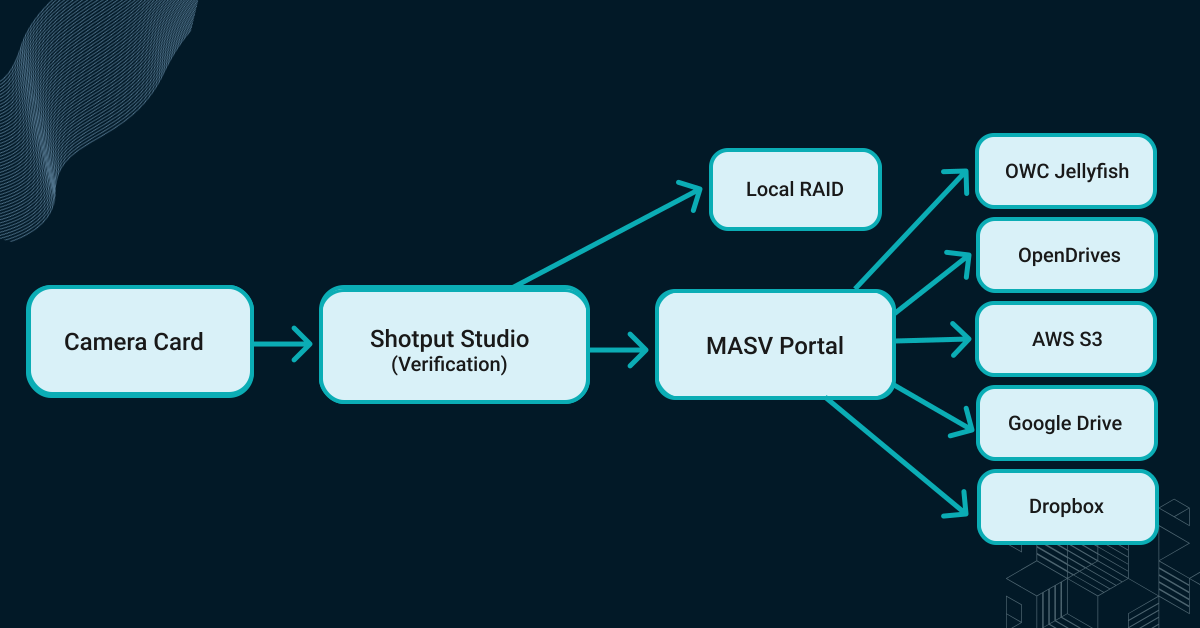
Key Features: Built For the Speed of Production

Cascading Parallel Transfers
MASV can start uploading from your fastest NVMe source drive while local copies or transcodes are still processing.

Automated Metadata Handoff
Automatically include media hash list (MHL) and PDF reports in your transfer, so the receiving lab has a complete audit trail.

Unlimited Scale
Whether you’re offloading a 256GB card or a 10TB project folder, MASV handles the heavy lifting without file package size limits.
From Camera Card to Cloud
Step 1: Set Your Destinations
Select your local drives (RAID, SSD) and select your MASV Portal within the ShotPut Studio interface.
Step 2: Trigger the Offload
Insert your media. ShotPut Studio begins the offload and verification process, generating your local copies.
Step 3: Auto-Upload
The moment the copy is verified, MASV begins the accelerated transfer to the cloud. You get a notification when the lab or your recipient has received the files.
Why Our Customers Love Us
MASV is trusted by by thousands of enterprises, professionals, and creators to streamline their media workflows.

MASV is file transfer without all the stuff that makes file transfer painful.
 |
Alan Saunders Dir. of Post-Production Curiosity Stream |

I recommend MASV to everybody. It’s a necessity to survive in this business.
 |
Sheila Lynch Operations Manager Hell’s Color Kitchen |

MASV does exactly what it’s supposed to do. It has solved all my file transfer problems.
 |
Steve Giammaria Senior Sound Editor Sound Lounge |
Perfect For Every Workflow

DITs & On-Set Data Managers
Satisfy insurance and compliance requirements for off-site backups before the production truck packs up for the day.

Remote Post-Production
Get high-res original camera files (OCF) to editors across the globe the moment the card is pulled – not the next day.

Live Events & News
Move verified footage from the field to the broadcast center and other destinations with zero manual intervention.
Frequently Asked Questions
Does MASV wait for the local offload to finish before starting?
Yes. MASV does not begin uploading verified files from your source drive until ShotPut has verified all files to the drive.
How does this workflow support the 3-2-1 backup rule?
This workflow automates the 3-2-1 backup rule: You get your local working copy (1), a local safety copy on a different drive (2), and a cloud/off-site copy (3) via MASV.
What cloud destinations are supported?
MASV supports 20-plus cloud and connected on-prem integrations, including Amazon S3, Frame.io, Google Drive, Backblaze, and many more.
Do I need a MASV account?
No. Simply enter a MASV Portal link in ShotPut and start uploading files to that Portal. Portals support one-to-many uploads and can be quickly configured to send data to one or multiple destinations simultaneously.
Related Integrations
Browse other MASV integrations with enterprise storage.
MASV with Nara >
MASV with Mistika >

MASV with Frame.io>
Stop Waiting for Uploads. Start Your Set-to-Post Workflow
Join the world’s leading DITs who trust ShotPut Studio and MASV to move media from camera to cloud faster than ever.