
Effortless Large File Transfers To and From Jellyfish by OWC
MASV’s secure Jellyfish integration lets you upload and send massive files to anyone, without the technical hassle.
Connect OWC Jellyfish to MASV today.
The Challenge: Quickly and securely sharing files from Jellyfish isn’t easy.

Wasted Time
Transferring large media files in and out of Jellyfish often means wasted time and the potential for unnecessary errors.

Lost Files
Remote contributors don’t always know where to send files, causing confusion and potentially lost packages.

Complex Workflows
IT needs to configure permissions and manually shuffle files into the right location, increasing operational overhead.
The MASV Solution: File Sharing from OWC Jellyfish, Simplified.
Seamless, Secure, and Effortless Collaboration
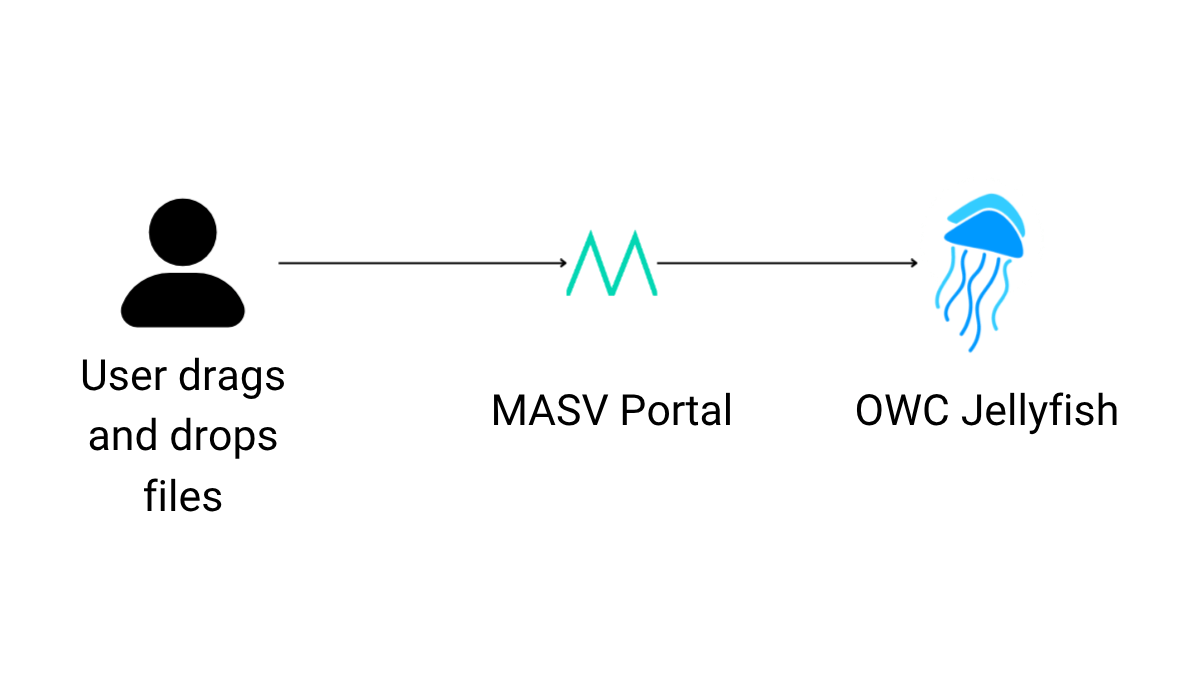
With MASV, anyone can securely deliver files to the right Jellyfish server — no logins, VPNs, or training required. Just share a link, and collaborators can upload or download with ease.
Thanks to the MASV Storage Gateway integration with Jellyfish, your team can automate transfers behind the scenes, eliminating tedious manual setup and file wrangling. The result: faster workflows, fewer bottlenecks, and more time to focus on creating great content.
Key Features of the MASV + Jellyfish Integration

No file size limits
Upload multi-terabyte files without traditional tooling constraints – ideal for high-resolution video, VFX plates, and project archives.
Secure and encrypted
All data is encrypted in transit and at rest, backed by MASV’s enterprise-grade security posture.

Direct to destination
Automatically land files in the right Jellyfish share or folder with no repeat transfers or shuffling on a local workstation.

Simple for anyone
Share a branded MASV link so non-technical collaborators can upload directly into Jellyfish using drag-and-drop tools – no accounts, plugins, or VPN required.

Flexible Pricing
Transparent pricing plans that suit the requirements of any organization, with no long-term contracts.
Set Up Your MASV-Jellyfish Connection in Minutes
Step 1
Enable the MASV Storage Gateway in Jellyfish Manager. Enter the ID and Secret from the MASV Integration page.
Step 2
In MASV, create a Portal and select your Jellyfish destination (share/folder) for direct ingest.
Step 3
Share the Portal link with your team or clients to start receiving files anytime, from anywhere.
Why Our Customers Love Us
MASV is trusted by by thousands of enterprises, professionals, and creators to streamline their media workflows.

MASV is file transfer without all the stuff that makes file transfer painful.
 |
Alan Saunders Dir. of Post-Production Curiosity Stream |

I recommend MASV to everybody. It’s a necessity to survive in this business.
 |
Sheila Lynch Operations Manager Hell’s Color Kitchen |

MASV does exactly what it’s supposed to do. It has solved all my file transfer problems.
 |
Steve Giammaria Senior Sound Editor Sound Lounge |
Perfect For Every Workflow

Editing teams
Speed up handoffs and start cutting sooner with near real-time direct-to-storage ingest.

On-set and field teams
Offload OCM and dailies from set directly to Jellyfish storage and access using MASV Remote Files.

Post-production
Move dailies, turnovers, and conforms into Jellyfish without babysitting transfers.

Agencies
Deliver campaigns at scale with branded Portals and clear file path routing.

Remote collaboration
Empower off-site editors, VFX artists, and freelancers to contribute directly to Jellyfish via MASV Portals.
Frequently Asked Questions
Are there file size limits when using MASV with my storage?
No. MASV supports multi-terabyte transfers and is designed for very large media files, and supports file packages of unlimited size.
How does MASV handle security?
MASV maintains an enterprise security posture suitable for professional media workflows. MASV secures data with at-rest and in-flight encryption on file packages in flight and at rest, strict access controls, and compliance with industry standards to ensure your files remain private and protected during transfer and storage.
Can I send files from my storage to someone else?
Yes. Use Remote Files in MASV to browse your Jellyfish and send packages directly with no local copy or physical access to the Jellyfish required.
Do external collaborators need a MASV account to send files to my Jellyfish?
No – MASV can act as a secure link to shared storage without configuring storage access for each user. Contributors can simply receive a MASV Portal link to upload files directly into Jellyfish without accounts, logins, or VPNs. Security and authentication can be enabled as needed, per portal.
How quickly can I set up the MASV + Jellyfish integration?
Most teams can get up and running in minutes by enabling MASV Storage Gateway in Jellyfish Manager, adding the ID & Secret, and creating a MASV Portal.
Does MASV impact Jellyfish performance while transferring?
No. MASV handles transfers efficiently in the background, so editors and creatives can continue working without disruption.
What happens if my internet connection drops mid-transfer?
MASV uses checkpoint restart and relentless retries to ensure every file resumes from where it left off, with no need to start over. MASV store-and-forward transfer sends files to the MASV cloud before they’re sent to the recipient – with no impact on performance – so if there’s an outage on the recipient side, the transfer won’t fail.
Related Integrations
Browse other MASV integrations with enterprise storage.



Stop Fighting With Jellyfish File Transfers
Join thousands of professionals who rely on MASV for fast, simple, and secure large file transfers to and from their favorite storage – including Jellyfish.